In Brief
Building a secure AWS Databricks Platform is less about creating a workspace and more about designing the boundaries around it. As Databricks security expands across networking, identity, application access, governance, and operations, those boundaries become part of the platform architecture itself.
Key Takeaways:
- PrivateLink is only one layer; DNS, routing, IP restrictions, ingress controls, and application access still need separate validation.
- Identity synchronization should preserve existing authorization instead of redesigning permissions at the same time.
- Applications should use dedicated service principals with OAuth M2M and least-privilege access.
- Terraform ownership, audit correlation, negative testing, and FinOps controls turn individual integrations into repeatable platform patterns.
We already had an AWS Databricks Platform running in production. Users had access, groups had permissions, and production workloads were running. The environment worked, but turning it into a secure enterprise Databricks platform required much more than configuring the workspace itself.
The harder part started when we needed to connect that environment properly to the rest of the enterprise: corporate networking, Okta, application identities, Terraform, audit logging, and cost controls.
That was the point where Databricks stopped being just a workspace and started becoming a platform. From then on, the AWS Databricks Platform had to be treated as an enterprise system rather than an isolated workspace.
Corporate users needed private access. Internal applications and SaaS products needed authentication. CI/CD pipelines needed identities that did not belong to employees. Security teams wanted audit events in their SIEM. Data permissions needed to be controlled independently from compute access. And sooner or later, someone was going to ask why a SQL Warehouse appeared to have been running all day.
At that point, the interesting engineering decisions were no longer inside Databricks itself. They were at the boundaries around it.
The environment was based on AWS, Unity Catalog, identity federation from a corporate IdP such as Okta, Terraform-managed infrastructure, and a production workspace with existing users, groups, permissions, and integrations.
This was not a greenfield lab. The platform already had state, dependencies, and people relying on it.
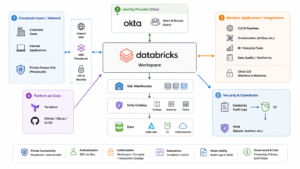
Figure 1: High-level view of networking, identity, application access, automation, governance, and security around an enterprise Databricks environment.
PrivateLink Is Only Part of the Private Connectivity Story
Databricks supports several different PrivateLink connectivity patterns on AWS, including inbound connectivity for users and applications, classic compute connectivity to the control plane, and outbound connectivity for serverless workloads. The important point is that these are separate traffic paths rather than one switch that makes the entire platform private. Databricks PrivateLink concepts on AWS
Creating a VPC endpoint is usually not the difficult part.
The interesting problems tend to appear around it. In an enterprise Databricks environment, those problems usually appear across several independent network and security layers.
For a corporate user or internal application, the connection typically crosses several systems:
- Corporate network
- Internal DNS
- AWS routing
- PrivateLink endpoint
- Databricks workspace
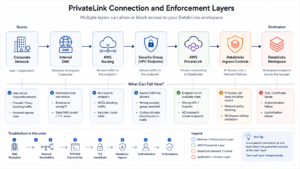
Figure 2: The private access path into Databricks and the independent enforcement points that can allow or block a connection.
Each layer can fail independently.
One design principle became particularly useful: applications should continue using the normal Databricks workspace hostname instead of being configured against a specific endpoint IP.
For example:
https://dbc-xxxxxxxx.cloud.databricks.com
The application should not need to know which endpoint interface or Availability Zone currently carries the traffic.
That abstraction matters for service routing, TLS, and operations. It also means internal DNS becomes part of the availability design.
You can deploy endpoint interfaces across multiple Availability Zones and still accidentally remove most of that redundancy by resolving the workspace hostname to a single zonal address.
Technically, the connection works.
Architecturally, DNS has just become the single path.
That might be acceptable during a proof of concept. In production, it should be a deliberate trade-off rather than a temporary shortcut that quietly survives for the next three years.
There is also an important distinction hidden behind the sentence, “We enabled PrivateLink.”
Inbound PrivateLink controls how users and applications reach workspace and account-level resources. Classic back-end PrivateLink covers connectivity from classic compute to the Databricks control plane. Serverless outbound connectivity is another path again.
Those are different traffic flows.
Privatizing one of them does not automatically secure the others.
So during an enterprise design review, I would always follow “PrivateLink is enabled” with a more precise question:
Which direction, for which traffic, and under which DNS and access policy?
Debug Connectivity One Layer at a Time
When someone reports that “Databricks isn’t working,” the symptom does not tell you which system is responsible.
I prefer debugging the connection from the bottom up.
Start with DNS:
nslookup dbc-xxxxxxxx.cloud.databricks.com
The important question is not only whether the hostname resolves. It is whether it resolves to the address expected for that network path.
Then verify TCP connectivity:
nc -vz <private-endpoint-ip> 443
If port 443 is not reachable, troubleshooting OAuth or Unity Catalog permissions is unlikely to help.
Once TCP works, move higher:
curl -vk https://dbc-xxxxxxxx.cloud.databricks.com/
A successful TCP connection followed by a TLS or application-level failure is already useful evidence. The routing problem is probably behind you.
The troubleshooting sequence I use mentally is:
DNS → Routing → TCP/443 → TLS → Databricks ingress controls → Authentication → Authorization
This becomes especially important when different teams own corporate networking, AWS, identity, and Databricks.
Without a shared model of the layers, incidents tend to bounce between teams because everyone is debugging a different part of the same connection.
Network Controls in an AWS Databricks Platform
Private connectivity is sometimes treated as if it finishes the networking discussion.
It does not.
An AWS security group protecting a PrivateLink endpoint and Databricks-side network controls answer different questions.
The security group determines whether a source can reach the endpoint at the AWS network layer.
Databricks determines whether that request should be accepted by the platform. This became part of the broader Databricks security model, not just an AWS networking decision.
In our environment, that also meant maintaining IP access rules for known corporate and automation sources.
Corporate traffic could originate from approved Zscaler egress addresses. Other integrations needed controlled access from sources such as GitHub runners and internal artifact-management infrastructure such as Artifactory.
I did not want the fact that a source could reach an AWS endpoint to automatically mean that it was allowed into Databricks.
That created another explicit boundary.
For workspace access, Databricks provides workspace IP access lists that can restrict connections to approved source addresses or CIDR ranges. Current Databricks networking controls also evaluate these restrictions alongside account-level context-based ingress policies, where configured. Databricks workspace IP access lists
Administrative access needed separate treatment.
Databricks account-console IP access lists control which source addresses can reach the account console and account-level APIs. I treated this as a separate security scope rather than assuming that a workspace rule automatically protected account-level administration. Databricks account-console IP access lists
That distinction matters.
A corporate user, an automation runner, an internal application, and an account administrator do not necessarily enter the platform through the same path or require the same network permissions.
It also changes how you think about a request such as:
Allow this application into Databricks.
That request may involve more than one control:
- The source egress path
- Corporate routing
- Internal DNS
- AWS security groups
- PrivateLink
- Workspace IP restrictions
- Databricks ingress policy
- Authentication
- Authorization
Adding a source to one allow list does not prove the complete connection path works.
The reverse is also true. A correctly configured Databricks rule does not help if AWS networking prevents the request from reaching the platform in the first place.
Layered controls are useful. The operational risk appears when nobody has documented that more than one layer exists.
Identity Is Part of Databricks Security
Identity management looks straightforward in a new environment.
Users are synchronized from an identity provider such as Okta, groups are created, and permissions are assigned.
The complexity appears later.
By then, Databricks groups may already control workspace assignment, SQL Warehouse access, Unity Catalog grants, jobs, entitlements, or administrative permissions.
Those groups are no longer just identity objects.
They are part of the platform’s authorization model. At that point, identity becomes part of Databricks security rather than a separate administrative concern.
Moving Identity Ownership to Okta
In this environment, I enabled Databricks Automatic Identity Management with Okta so that identity and group membership could be managed from the identity provider instead of being maintained separately inside Databricks.
That changes the operating model in an important way.
Okta becomes the source of record for identity and membership, while Databricks consumes that information when making access decisions.
Databricks refreshes group membership during activities that trigger authentication or authorization checks, helping group-based permissions remain aligned with changes made upstream.
But synchronization does not mean every access decision becomes automatic.
Group membership and workspace assignment are still different controls.
That distinction separates two responsibilities:
- Okta controls who belongs to the group.
- Databricks controls where that group is allowed to operate.
For Okta environments, nested-group behavior also needs to be considered explicitly rather than assuming that an arbitrary IdP hierarchy will be reproduced inside Databricks.
For me, the important part was not simply turning synchronization on.
It was introducing it without breaking the authorization model that already existed.
Preserve Authorization While Changing the Identity Source
When existing Databricks groups already own permissions, replacing them casually can have a much larger impact than expected.
A group may already have Unity Catalog grants, workspace assignments, SQL Warehouse permissions, or other configuration attached to it.
A safer migration is to preserve the authorization structure while moving identity ownership upstream.
The sequence becomes:
- Identify the existing Databricks groups.
- Map them to the corresponding IdP groups.
- Enable and validate synchronization.
- Pilot the change with a limited user set.
- Verify workspace assignment and effective permissions.
- Retire the previous provisioning path only after validation.
Keeping identity migration and permission redesign separate makes troubleshooting much easier.
If a user suddenly loses access, the possible causes are narrower. Synchronization may be wrong. Workspace assignment may be missing. Or the existing authorization path may not be behaving as expected.
Changing group structure and permissions at the same time would make those failures much harder to isolate.
Effective Access Matters More Than One Group
There is another trap here: reviewing users one group at a time.
Imagine a user belongs to both:
- data-analysts
- platform-admins
Reviewing the first group may suggest read-only access.
The effective user is still an administrator.
Privileges accumulate.
So the useful access-review question is not:
Which group is this user in?
It is:
What permissions does this user receive from every group they belong to?
This becomes even more important when group membership is managed upstream in Okta.
Databricks can synchronize the identity exactly as configured and the resulting authorization can still be wrong because the source membership itself was wrong.
Identity synchronization is not only an onboarding mechanism.
It is part of the authorization architecture.
Applications Should Have Their Own Identity
One of the easiest ways to connect an application to a data platform is also one of the easiest ways to create a future operational problem: use a personal access token generated by an engineer.
It works until the integration depends on that engineer’s identity.
Now the credential follows an employee lifecycle, may inherit permissions that were never intended for the application, and can become difficult to own or rotate after the original project is finished.
For automated workloads, a cleaner model is a dedicated service principal using OAuth machine-to-machine authentication.
The identity represents the workload rather than the person who configured it.
That distinction has practical consequences.
Audit events identify the application clearly. Credential rotation is not tied to employee offboarding. Permissions can be reviewed against the application’s actual requirements. Ownership becomes explicit.
This model works well for CI/CD systems, orchestration platforms, monitoring products, BI tools, and SaaS integrations.
Credentials deserve the same boundary thinking.
A service principal with OAuth is still only as healthy as the credential representing it.
Application secrets should live in an approved secrets-management system, be rotatable without redesigning the integration, and never be embedded in notebooks, Terraform defaults, CI logs, or chat threads.
If the identity is dedicated but credential handling is casual, the risk has simply moved one layer down.
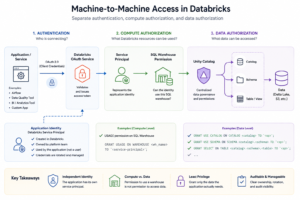
Figure 3: Machine-to-machine access separates application authentication, permission to use Databricks compute, and authorization to access data through Unity Catalog.
Compute Access and Data Access Are Different Permissions
Databricks provides another useful boundary here.
Permission to use a SQL Warehouse is not the same as permission to access data through Unity Catalog.
A read-only service principal might require:
- Permission to use the required SQL Warehouse
- USE CATALOG
- USE SCHEMA
- SELECT on the required data
For example:
GRANT USE CATALOG
ON CATALOG <catalog>
TO `<service-principal>`;
GRANT USE SCHEMA
ON SCHEMA <catalog>.<schema>
TO `<service-principal>`;
GRANT SELECT
ON TABLE <catalog>.<schema>.<table>
TO `<service-principal>`;
That separation is worth preserving.
If a data-quality application needs access to three schemas, assigning it an existing broad analyst role because “that already works” is convenient today and difficult to explain during an access review six months later.
An application-specific identity with explicit grants takes slightly more work up front.
It leaves a much cleaner platform behind.
Unity Catalog Is Not the Last Permission Layer
There is another boundary that is easy to overlook.
Permission to query data is not always the same as permission to reach the storage underneath it.
For external S3 data, storage credentials, external locations, and AWS IAM sit between Databricks permissions and the underlying storage path.
That means a principal may appear to have the correct higher-level data permissions and still encounter a problem in the storage configuration underneath them.
The reverse is also worth thinking about: overly broad storage access can weaken an otherwise careful table-level authorization model.
So when an application “can’t read the data,” I do not stop at:
Which Unity Catalog grant is missing?
I also want to know whether the failure sits at the catalog, schema, table or view, external location, storage credential, or AWS IAM layer.
Again, the boundary matters more than the individual product feature.
Terraform's Hardest Problem Is Not HCL
Terraform makes platform configuration reproducible, but its biggest operational benefit is not the syntax.
It is establishing ownership.
Consider a common sequence:
- A permission issue appears.
- An administrator changes something manually in Databricks.
- The problem disappears.
- The change never makes it into Terraform.
- Weeks later, a pipeline runs terraform apply.
- The fix disappears too.
Terraform did not break the platform.
The resource had two sources of truth.
As Terraform manages more of the environment — service principals, groups, catalogs, schemas, permissions, workspace configuration, and network-related controls — that distinction becomes increasingly important.
The rule I prefer is simple:
If Terraform manages the resource, the final production state should exist in Terraform.
That does not mean administrators should never use the UI.
Manual changes can be extremely useful while debugging.
But once the diagnosis is complete, the state needs a clear owner.
Either the manual change was temporary and should be reverted, or it was correct and should become code.
The dangerous state is the undocumented third option:
We fixed it manually and forgot about it.
The same principle applies to access rules.
If an IP range is added temporarily so that a corporate egress path or automation runner can reach the environment, that change needs an owner and a lifecycle.
Otherwise temporary access has a habit of becoming permanent infrastructure.
Audit Logs Become More Useful When They Leave Databricks
Databricks rarely exists alone in an enterprise security environment.
Authentication events live in the identity provider. Network telemetry lives in AWS. Deployment activity may come from GitHub Actions, Jenkins, or another CI/CD system.
If Databricks administrative activity stays isolated, an investigation immediately becomes a multi-team exercise.
Exporting those events into the organization’s security pipeline changes that.
A typical path sends Databricks audit events to S3 and then into the organization’s security-ingestion layer and SIEM.
The value is not simply storing another set of logs.
It is being able to correlate activity across systems.
A new administrative grant can be compared with an identity-provider event. A service-principal change can be matched with a deployment. An unusual authentication event can be examined alongside AWS network telemetry.
That turns several isolated data sources into one investigation path.
And as with any logging pipeline, configuration is not enough.
Generate a known administrative event and verify that it actually arrives in the SIEM.
A configured pipeline and a working pipeline are not always the same thing.
FinOps Can Reveal Problems That Monitoring Misses
SQL Warehouses are a good example of why cost belongs in platform-engineering conversations.
Imagine a warehouse showing close to a full day of billed runtime.
Now compare that with query history.
If almost no meaningful queries ran during the same period, the platform is telling two different stories.
From a traditional monitoring perspective, everything may look healthy. The warehouse is available, authentication works, and no application errors are firing.
FinOps asks a different question:
Why is this resource running?
That is often the more useful question.
The investigation can move from account-level usage down to the workspace, warehouse, billed hours, DBU consumption, and finally query history.
The cost number alone does not tell you whether there is a problem.
An expensive warehouse may be supporting an important workload.
The more interesting signal is the relationship between consumption and activity, especially when you see:
High consumption + low activity + unclear ownership
That can indicate more than wasted cloud spend.
It may reveal configuration drift, abandoned infrastructure, or a lifecycle process that never really finished.
This is where ownership metadata becomes surprisingly valuable.
For production resources, I want to be able to identify at least:
- Team
- Environment
- Workload
- Cost center
- Owner
FinOps can attribute spend. Security can identify who owns an application identity. Platform engineering can find abandoned infrastructure. Incident responders know whom to contact.
Good metadata solves more problems than it first appears to.
Test What Should Fail
Enterprise validation often proves only the happy path.
The user can log in. The service principal can query a table. PrivateLink accepts the connection. The audit configuration exists.
Those are useful tests, but they do not prove that the boundaries are working.
Negative tests do.
For data access:
- Approved catalog: succeeds
- Unrelated catalog: fails
For network access:
- Approved corporate egress: succeeds
- Approved automation source: succeeds
- Unapproved source: blocked
For identity:
- Expected group membership produces the intended access
- Unrelated group memberships do not create unexpected elevation
For audit logging:
- Generate a known administrative event
- Verify that the event appears in the SIEM
For SQL Warehouses:
- Compare configured lifecycle policies with actual consumption
That distinction matters.
A configuration test tells you that a control exists.
A negative test tells you that the architecture behaves the way you think it does.
A Practical Release Pattern for New Integrations
Once the individual pieces were clearer, the next goal was to stop treating every new integration as a new security design. A secure Databricks platform becomes much easier to operate when those controls are applied as a repeatable pattern.
For a production integration, I prefer the release checks to be boring and repeatable.
That usually means confirming:
- A dedicated service principal exists with a clear owner.
- Credentials are stored through an approved secrets-management path.
- OAuth M2M works without depending on a personal access token.
- The application’s network source is explicitly understood and approved.
- Required workspace IP restrictions are in place.
- Account-console access remains limited to the appropriate administrative sources.
- SQL Warehouse or compute access is granted explicitly.
- Unity Catalog permissions are limited to the required catalogs, schemas, and tables.
- Storage and external-location access work only for the intended paths.
- Unrelated catalogs and unapproved networks fail as expected.
- A known administrative or authentication event appears in the SIEM.
- Team, environment, workload, cost center, and owner metadata are attached before the resource is considered production.
If that checklist feels repetitive, that is the point.
Repeatability is what turns one secure integration into a platform pattern.
Repeatability Is the Goal of an Enterprise Databricks Platform
A good enterprise data platform should not require a new security model every time another integration appears. That is especially true for an enterprise Databricks platform, where networking, identity, authorization, and ownership all need to remain consistent.
A new application should follow an established machine-access pattern: dedicated service principal, OAuth M2M, explicit network path, explicit compute access, least-privilege Unity Catalog permissions, and a defined owner.
A new corporate network or automation source should have a known path through routing, security groups, DNS, PrivateLink, Databricks IP restrictions, and ingress controls.
A new employee group should originate from the identity provider rather than being reconstructed manually inside individual workspaces.
A new production SQL Warehouse should have ownership and lifecycle expectations before it quietly becomes permanent infrastructure.
This is where an AWS Databricks Platform starts to become easier to operate.
Not because any individual component is especially clever, but because teams stop inventing a different access model for every new requirement.
The Workspace Was Never the Hard Part
The difficult part of enterprise Databricks architecture is not creating the workspace.
It is designing the boundaries around it deliberately.
PrivateLink has to align with corporate routing and DNS. IP restrictions have to reflect real corporate and automation egress paths. Workspace and account-console access need separate controls. Identity synchronization has to preserve authorization. Applications need identities that do not belong to employees. Compute permissions and data permissions need separate controls. Storage access needs to agree with the catalog model. Terraform needs clear ownership of the production state. Audit activity needs to join the rest of the organization’s security telemetry. Cost needs to be compared with actual behavior, not just reviewed on an invoice.
Each layer answers a different question:
- How does traffic reach the platform?
- Is that network source approved?
- Who or what is connecting?
- Which resources can that identity use?
- Which data can it access?
- Can it reach the storage underneath?
- Who owns the configuration?
- Where can the activity be investigated?
- Why is this resource still running?
That consistency is what turns a collection of Databricks features into a manageable AWS Databricks Platform. Once those answers are intentional rather than accidental, Databricks stops being just another workspace.
It starts behaving like a platform.
Looking to architect robust security boundaries around your AWS Databricks environment?
Contact us to set up a technical deep-dive.