In Brief
This blog post explores how modern organizations are moving beyond traditional VPNs to implement more secure and efficient access models.
- Understand why legacy VPNs create structural security risks in modern cloud environments.
- Compare four key architectural patterns: ZTNA, Enterprise Browsers, Extensions, and Enclaves.
- Learn how to leverage AWS services like IAM Identity Center for seamless integration.
There’s a moment every security architect eventually faces. Someone asks: “Why does our contractor in Tel Aviv need to connect to a VPN in Frankfurt, just to access an Internal app that lives in AWS Ireland?” Establishing modern AWS access workflows provides the definitive answer by removing the need for traditional, slow network backhauling.
We often cling to legacy habits, delaying the necessary shift in our approach. The VPN was a brilliant invention for its time-users in an office, apps in a data center, and a perimeter around both. That model made sense in 2005. In 2026, the perimeter has completely dissolved, and organizations are seeking modern access patterns to patch tunnels into a world that no longer exists.
This post isn’t about a specific product. It’s about the four architectural patterns replacing the VPN, and how to think about which one belongs in your environment-particularly if you’re running workloads on AWS.
Key Takeaways:
-
The Fall of Legacy VPNs: Traditional VPNs create significant security risks by offering excessively broad network access, failing to control unmanaged BYOD devices, and causing severe latency through backhauling traffic.
-
Four Architectural Alternatives: Modern access shifts to targeted models ZTNA for application-level access, Enterprise Browsers for in-session web/SaaS control, Extensions for lightweight browser security and Secure Enclaves for isolated desktop workspaces.
-
Native AWS Integration: These modern access patterns integrate seamlessly with AWS primitives like AWS IAM Identity Center for identity federation, Transit Gateway for outbound routing and CloudTrail for complementary logging.
-
Tailored Decision Framework: Choosing the right pattern depends on five key parameters: user application types, device ownership (managed vs. BYOD), threat model priorities, compliance depth and organizational change appetite.
-
Layered Security Strategy: The most effective AWS deployments combine models using ZTNA for access control alongside an Enterprise Browser for deep in-session interaction and data loss prevention (DLP).
Why VPN Falls Short Today
Three structural problems make legacy VPNs the wrong tool for modern cloud environments and distributed teams:
- Network access is excessively broad: A VPN puts users on your network-all of it. Least-privilege access is almost impossible to enforce at the network layer.
- The unmanaged device problem: Contractors on personal laptops without posture checks extend your attack surface to every unpatched machine on their network, severely compromising your BYOD security on AWS.
- Inefficient Routing (Backhauling) is absurd: Routing a Salesforce request through your data center to inspect it before it reaches Salesforce adds latency, costs money, and solves nothin
Architectural Patterns for Secure Cloud Access
When organizations move away from VPN, they typically adopt one of the following four architectural patterns. While these are the most common, other architectural solutions also exist, and each addresses a distinct security challenge.
Pattern 1: ZTNA and Zero Trust Architecture
“Replace the tunnel with application-level access”
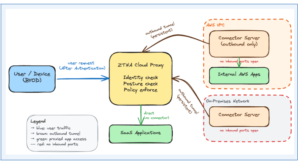
ZTNA flips the model entirely. Instead of putting users on your network, you give them direct access to specific applications-and nothing else. A cloud proxy brokers every connection, verifying identity and device posture for each request independently. The user’s device never touches your internal network.
- Best for: Organizations with a mix of cloud and on-premises resources looking to replace site-to-site VPNs, regulated industries needing per-application audit trails.
- The catch: ZTNA secures access to applications, not what happens inside them. Copy-paste of sensitive data, uploads to personal storage-all of that happens beyond ZTNA’s visibility horizon.
Pattern 2: The Enterprise Browser
“Make the browser the security perimeter”
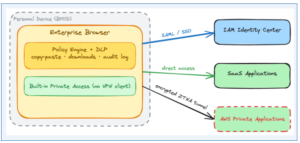
Instead of securing the network path to the application, you secure the environment where the user actually interacts with it – the browser itself. An enterprise browser is a hardened, policy-controlled, Chromium-based browser that enforces DLP policies, logs every action, prevents unauthorized copy-paste, and verifies device posture-all without MDM enrollment on the personal device. It can communicate with your AWS environment using a secure ZTNA tunnel.
- Best for: BYOD and contractor-heavy workforces, organizations where most work is web-based and SaaS.
- The catch: Users must switch browsers – a real change management challenge. Non-browser applications (thick clients, SSH, database tools) are not covered without an additional network-layer component
Pattern 3: The Browser Security Extension
“Don’t replace the browser-secure it from the inside”
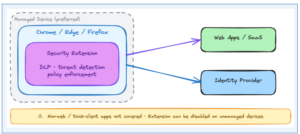
A lighter-weight alternative: a browser extension that installs into Chrome, Edge, or Firefox and adds a policy enforcement layer from within. No new browser, no retraining, and no change management overhead. Extensions in this category can inspect web traffic in real-time, enforce DLP controls, and block malicious sites.
- Best for: Managed device environments where you already control the browser, teams prioritizing speed of deployment over depth of control.
- The catch: Extensions can be disabled or removed on unmanaged personal devices. For true BYOD with sensitive data, this approach needs supplementary controls to be reliable.
Pattern 4: The Secure Enclave
“Create a walled workspace on the personal device”
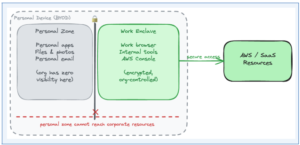
This approach creates a locked, encrypted container on the user’s personal machine. Work applications run inside the enclave, the organization controls what goes in and out. Everything outside-personal files, email, photos-is completely invisible to the organization. Think of it as local VDI: no cloud streaming latency, and no full MDM enrollment required.
- Best for: Non-web application access (thick clients, database tools), strong data residency requirements, scenarios where you need to onboard users quickly without enrolling their devices.
- The catch: Installing a container on a personal laptop can face employee resistance. Clear communication about what the organization can and cannot see is essential.
The Honest Comparison
| Capability | ZTNA | Enterprise Browser | Browser Extension | Secure Enclave |
|---|---|---|---|---|
| Replaces VPN tunnel | ✅ Fully | ✅ Web apps | ⚠️ Partially | ✅ Fully |
| Non-web app support | ✅ Yes | ⚠️ Limited | ❌ No | ✅ Yes |
| BYOD / unmanaged device | ✅ Good | ✅ Best | ⚠️ Risky | ✅ Good |
| In-session DLP | ❌ None | ✅ Deep | ✅ Good | ✅ Good |
| User friction | Low | Medium | Very Low | Medium |
| AWS IAM IC integration | ✅ Native | ✅ Native | ✅ Native | ✅ Native |
| Blocks data exfiltration | ❌ | ✅ | ✅ | ✅ |
| Device posture enforcement | ✅ | ✅ | ⚠️ Partial | ✅ |
Aligning Modern AWS Access with Cloud Security Architecture
All four patterns integrate naturally with AWS native primitives. When striving to deploy AWS Zero Trust principles, the cloud architecture you already have is the right foundation:
- AWS IAM Identity Center is the identity layer for all four-SAML federation means a single pane of glass across all your AWS accounts.
- Connectors for private resource access (used by ZTNA and enterprise browsers) should live in your shared services VPC, reachable via Transit Gateway-outbound-only, meaning no inbound firewall rules are required.
- CloudTrail captures AWS API actions, your chosen access solution should capture the pre-API layer-what the user did in the browser or application before the API call was made.
- SCPs still apply. The access solution should never become a bypass of your organizational guardrails.
How to Choose: Five Questions
- What are users actually accessing? Primarily web and SaaS? Enterprise browser or ZTNA. Thick clients and SSH too? ZTNA or secure enclave.
- What does your device population look like? Managed laptops give full flexibility. Unmanaged BYOD narrows it to enterprise browser, ZTNA, or secure enclave.
- What is your real threat model? Unauthorized access ZTNA. Data exfiltration enterprise browser, extension, or enclave.
- What is your compliance posture? Per-action logging (not just connection logging) typically requires an enterprise browser or secure enclave.
- What is your change management appetite? Extension is lowest friction. Enterprise browser requires a browser switch. Enclave requires an install. ZTNA requires a client or agentless config.
Closing Thoughts
The question isn’t “which VPN replacement should I buy?” It’s “what am I actually trying to protect, against what threat, for which users?”
Answer those three questions clearly, and the architectural pattern will suggest itself. In practice, the most robust deployments of modern AWS access combine two layers: ZTNA for access control (can they get there?) and an enterprise browser for interaction control (what can they do when they arrive). For simpler BYOD-only scenarios, the enterprise browser alone-with built-in private access-is often enough.
You’re not rebuilding your security architecture from scratch. You’re adding the right control at the right layer-on top of the AWS foundation you already have.
Ready to modernize your remote access strategy?
Contact the AllCloud security team today to evaluate your environment and design a tailored Zero Trust access model for AWS.