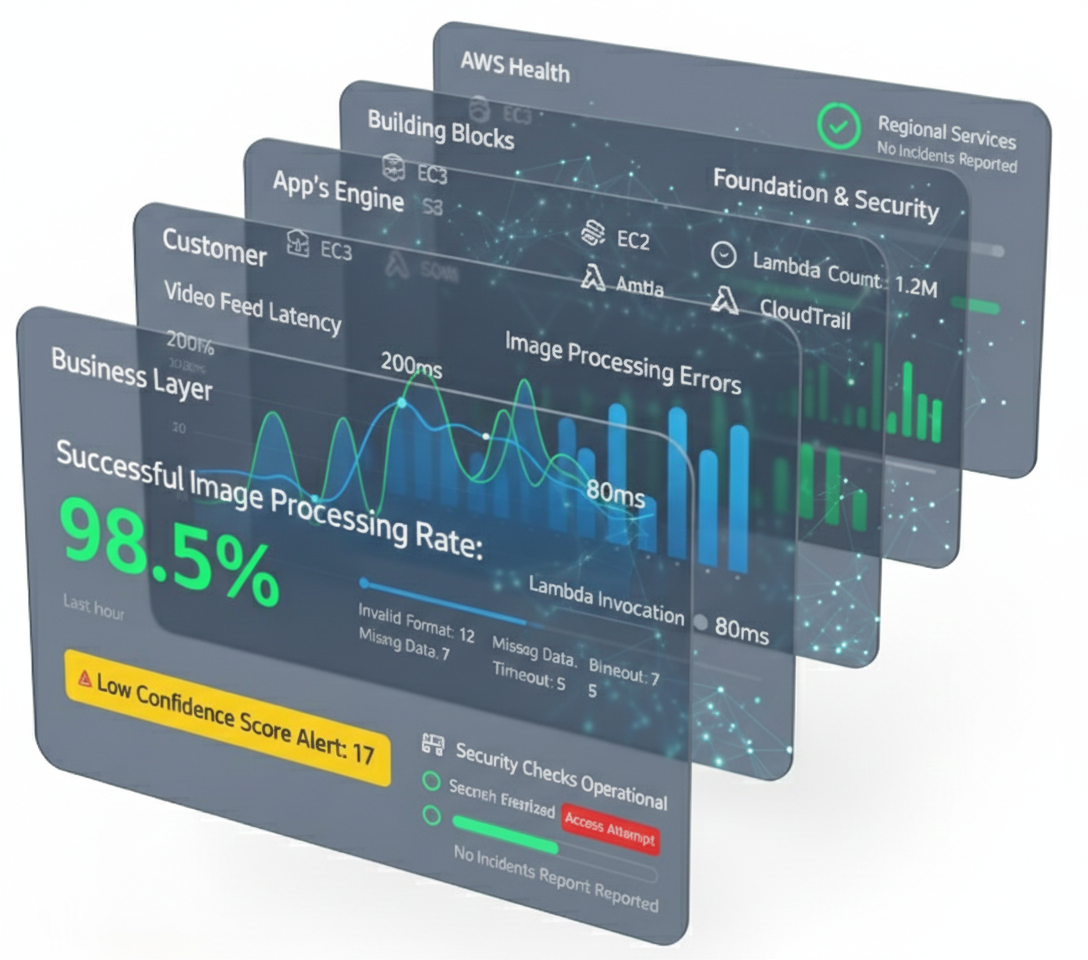
In today’s world, your business depends on its apps working perfectly. If a security camera’s video feed is slow or the control system crashes when a critical event is detected, you can lose valuable time and compromise security. So, how do you make sure everything is running smoothly, from what the operator sees all the way down to the technical bits on AWS? Observability, sure, but how practically do you implement it in AWS?
One powerful way to approach this is to look at your system in layers, like a stack of building blocks.
This guide details a top-to-bottom method for checking your app’s health in AWS using AWS observability tools, starting with the business layer and working down the stack to isolate problems. Examples will use common AWS tools within the context of a defense industry camera vision and control system.
Why Look in Layers?
Instead of drowning in technical details, this layered method helps you connect operational problems to tech glitches quickly. It provides a clear path not just for investigation when things go wrong, but also for observation, helping you monitor what has a major impact on your business. This ensures you focus your energy on what truly matters, instead of chasing minor technical issues that don’t affect your critical operations or your bottom line.
Layer 1: The Business Layer – Are We Hitting Our Goals?
This is the most important layer-the top of our stack. Here, we track numbers that tell us if the system is healthy. For a vision and control system, this could be things like the number of successful image captures and processing events, system uptime, or the number of critical alerts resolved within a service level agreement.
How to do this in AWS: The most direct way is to send key operational numbers from your application straight to Amazon CloudWatch as Custom Metrics. For example, your code can send a “+1” to a metric named “SuccessfulImageProcessing” every time an image is successfully analyzed and archived.
In CloudWatch, you can build real-time dashboards combining operational and technical metrics. Crucially, CloudWatch Alarms can be set up to alert you instantly (e.g., if image processing success drops), enabling proactive problem-solving. For deeper analysis and business reports, tools like Amazon QuickSight or Grafana can be used.
Layer 2: The Customer Layer – What Are Operators Experiencing?
This layer is all about what your operators actually see and feel, specifically within your most important business flows. Instead of just measuring general system speed, you focus on the performance of critical operator journeys, like the video feed acquisition, the image analysis pipeline, or the device connection/re-connection process.
How to do this in AWS:
- Real User Monitoring (RUM): Tools like CloudWatch RUM track performance and errors on the user interface for critical business flows. This helps answer, “Is the main control dashboard experiencing high latency on real-time video feeds?”
Robot Testers (Synthetics): You can use CloudWatch Synthetics to create “robot testers” that simulate an entire operational flow from start to finish. For example, a robot can simulate a device connecting, sending an image, and receiving a control command every five minutes. If any step in that critical journey fails or is too slow, you get an immediate alert.
Layer 3: The App's "Engine" Layer – How Are the Insides Working?
This is the core of your app. When an operator-facing issue arises, this layer helps locate the failing part and assess its direct operational impact. Crucially, it links technical components, like the “image-processing-service”, to the business flows they support, such as “users-alerts”.
How to do this in AWS:
- Follow the Request: A tool called AWS X-Ray lets you follow a single command or data packet as it travels through the different services of your app. It creates a map that shows you exactly where things are slowing down or breaking during a critical process like image analysis.
Turn Logs into Metrics: Your app creates messages, or “logs,” about everything it does. These should be sent to Amazon CloudWatch Logs. Beyond just searching for text, you can create Metric Filters to automatically count important events in your logs. This turns them into measurable metrics. For example, you can create a metric that counts every “Control System Timeout Error” log message. You can then set an alarm on that metric, so you are immediately notified that the command part of your business flow is broken.
Layer 4: The AWS Building Blocks Layer – Are Our Tools Healthy?
Your app is built on top of basic AWS services. The crucial step in this layer is to map these infrastructure components to the business flows they serve. For example, the database that handles control commands is far more critical during an outage than the one that stores device configuration backups. Knowing this dependency helps you prioritize alerts and focus your attention.
How to do this in AWS:
- Map Dependencies: Use AWS tags to label resources with the business flow they support (e.g., a tag like “business-flow: control-command-pipeline” on a specific database and set of containers).
- Build Focused Dashboards: Create dashboards in CloudWatch or Grafana for each critical business flow. The “Control Pipeline Health” dashboard should include not just application metrics but also the health of all the tagged infrastructure that supports it.
- Monitor Key Metrics: With this context, you can now monitor key Amazon CloudWatch metrics with a clear understanding of their potential business impact. For example:
- Database: Is the database storing analyzed data and metadata too busy?
- App Containers: Are the containers for the “vision-analysis” function running out of memory?
- Fast Memory (Cache): Is the cache hit rate low for the “device-registry” service, slowing down device lookups?
This approach ensures that when an infrastructure alarm fires, you instantly know which part of the operation is at risk.
Layer 5: The Foundation & Security Layer – Is Our House in Order?
This layer is about making sure your entire AWS setup is safe and built correctly. It’s like checking the foundation and locks on your house.
How to do this in AWS: AWS has tools like Amazon GuardDuty that act like a security guard for your account. They constantly watch for suspicious activity and tell you if any of your settings are unsafe, like if a database is accidentally exposed to the internet
and AWS Security Hub that helps centralize your operation.
Layer 6: The AWS Health Layer – Is it Them or Us?
Sometimes, a problem isn’t your fault. AWS itself can have issues. This layer is about knowing if a problem is bigger than just your app.
How to do this in AWS: AWS provides a personal Health Dashboard. This is a special page that tells you if any AWS problems might be affecting your specific services. It’s the first place to check if many things suddenly stop working.
Putting It All Together
AWS has powerful tools for application observability, and by setting up these layers, you get a clear path for finding problems. Imagine this scenario:
- Business Layer: A CloudWatch Alarm fires: “Successful image processing rate is down 30%!”
- Customer Layer: You check your Synthetics dashboard and see the “Process Image and Command” robot tester is failing at the image analysis step.
- App’s “Engine” Layer: Another alarm shows the metric for “ImageProcessingErrors” is spiking, pointing directly to your image-processing service.
- AWS Building Blocks Layer: You immediately look at your “Control Pipeline Health” dashboard and see the ECS cluster tagged with “business-flow: user vision alerts” is overloaded.
- Foundation Layer: You confirm the foundation is ok. No issues or risks to your business.
- AWS Health Layer: You confirm AWS is working fine. The problem is yours to fix.
Final Thoughts
When implementing application observability in AWS, layered thinking simplifies troubleshooting by focusing on critical operations, but no single observability strategy fits all. This model is a flexible guide, not strict rules. The right approach depends on your organization, architecture, and complexity. The ultimate goal is connecting infrastructure health to business outcomes, enabling quick action, smooth app operation, customer satisfaction, and business growth.