This guide walks through migrating from RDS PostgreSQL to Aurora Serverless v2, completed with ~30 seconds of user-visible downtime.
In Brief
- How to audit your RDS environment before starting
- Why the DNS Flip + Rolling Restart is the optimal approach and how it minimizes downtime without data loss
- The exact cutover timeline and what to do at each step
- How to validate data integrity and roll back safely
- Real cost and performance results after migration
This Aurora Serverless v2 migration guide documents a complete production path for teams running PostgreSQL on Amazon RDS who frequently encounter the same structural limitations: over-provisioned capacity sitting idle outside peak hours, escalating I/O charges on read-heavy workloads, complex major version upgrades, and replica lag that forces application reads back to the writer instance.
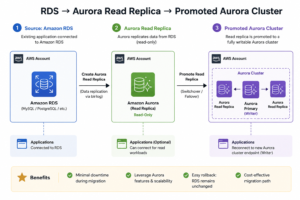
By leveraging an Aurora read replica promotion combined with a strategic application rolling restart, we successfully executed this transition with approximately 30 seconds of user-visible connection drops.
Key Takeaways
-
Near-Zero Downtime Execution: Combining a DNS swap with an intentional application rolling restart completes the production migration with only ~30 seconds of brief connection drops.
-
Optimized Storage & Compute Costs: Transitioning to Aurora I/O-Optimized flat-rate pricing and dynamic Serverless v2 ACU auto-scaling eliminates predictable over-provisioning expenses.
-
Enhanced Read Performance & Reliability: Aurora shared storage drops replica lag from seconds to single-digit milliseconds and provides rapid failover within 10–30 seconds.
Why Migrate
The migration delivers improvements across three categories: cost, performance, and operational posture.
- Lower costs on read-heavy workloads. Aurora I/O-Optimized eliminates per-I/O charges in favor of flat-rate storage pricing. According to AWS guidance, if I/O charges represent more than approximately 25 percent of total Aurora cost, I/O-Optimized is the more economical choice.
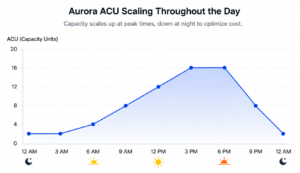
- Pay only for what you use. Serverless v2 scales capacity dynamically in ACUs (Aurora Capacity Units) based on actual demand, eliminating fixed costs for capacity that sits idle outside peak hours. A minimum ACU floor maintains warm cache and enables Performance Insights; a maximum ceiling provides headroom for traffic spikes. Most production workloads operate within a Min 2 / Max 8 to 32 ACU range, depending on load profile.
- Improved read performance. Aurora’s shared storage architecture keeps reader replicas within approximately 10 milliseconds of the writer, compared to the multi-second lag that RDS replicas can exhibit under load. This makes the reader endpoint reliable for application reads, offloading work from the writer and improving overall throughput.
- Higher availability. When the writer instance fails, Aurora promotes a reader in 10–30 seconds through an internal endpoint swap, rather than the multi-minute DNS-based promotion process used by RDS Multi-AZ. The result is significantly lower mean time to recovery during incidents.
Why it’s a safe move
Aurora PostgreSQL is wire-compatible with standard PostgreSQL: same engine, same SQL, same extensions (PostGIS, pgvector). Application code requires no modification. This makes the Aurora Serverless v2 migration transparent to your
application layer. Each of these improvements is a direct outcome of the Aurora Serverless v2 migration architecture.
Pre-Migration Assessment
A successful Aurora Serverless v2 migration begins with a thorough audit of the current environment. Collect the following metrics from CloudWatch over a two-week observation window:
- CPU utilization (average)
- IOPS distribution (reads versus writes)
- Active connection count
- Database size relative to instance memory
- Storage growth rate
Items to verify before initiating the migration:
- Endpoint abstraction. Verify how your applications reference the database. Direct RDS host strings should be replaced by an abstract connection string, DNS alias, or local alias. If services are tightly coupled to the physical RDS endpoint, routing traffic to the new Aurora cluster will require updating and redeploying every consuming application simultaneously during the migration window.
- Automatic minor version upgrades. Disable AutoMinorVersionUpgrade on source RDS instances to prevent engine version drift during the migration window.
- Unused databases. Drop databases with no active connections. Aurora replicates all databases within the instance by default, so removing unused ones reduces unnecessary replication overhead and synchronization time.
- DNS Time-To-Live (TTL). Lower your database DNS TTL from its default (typically 300 seconds or higher) down to a 30-to-60-second range at least one hour before the planned cutover to ensure rapid propagation across all clients.
- Stale replication slots. Inactive logical replication slots prevent WAL cleanup on the source and can block Aurora from completing initial synchronization. Query pg_replication_slots to identify and drop any inactive slots before proceeding.
- Query planner tuning. Set random_page_cost = 1 in the Aurora cluster parameter group. The PostgreSQL default of 4 is calibrated for spinning disks, while Aurora uses SSD-backed shared storage where random and sequential reads have similar cost characteristics.
- Application compatibility testing. Before initiating the migration, validate your application against an Aurora PostgreSQL instance in staging environment. Verify that all required extensions exist (pg_stat_statements, postgis, pgvector, etc.), run your full test suite against Aurora, and check for any ORM or driver-level edge cases. Aurora is wire-compatible with PostgreSQL but parameter group defaults differ, so confirm your application behaves identically under Aurora’s defaults before the production window.
Aurora Serverless v2 Migration Strategy:
Read Replica Promotion
The recommended approach is to create the target Aurora cluster as a read replica of the existing RDS instance. Aurora synchronizes in the background with no impact on production traffic, and is later promoted to a standalone writable cluster at your chosen cutover time.
Target Architecture
- High availability layout: One writer instance and at least one reader instance per cluster to ensure automatic failover capability from day one.
- Dynamic scaling capacity: A balanced Serverless v2 ACU configuration on each instance (e.g., Min 2 / Max 16 ACUs), tuned to accommodate your baseline workload and handle sudden traffic spikes.
- Storage tiering: The Aurora I/O-Optimized storage class to provide predictable flat-rate pricing.
- Engine alignment: The target Aurora PostgreSQL version must match the source RDS engine and minor version exactly to ensure replication compatibility.
- Abstract routing records: Managed DNS or service discovery aliases (such as CNAME records) mapping separate, clean endpoints for your primary writer and your read-replicas.
During the initial deployment phase via your Infrastructure as Code (IaC) pipeline, the Aurora cluster is provisioned to operate strictly as a read-only replica of the source database. It transitions into a fully standalone, writable cluster only when you explicitly trigger the promotion command or update your infrastructure configuration during the cutover window.
The Cutover Decision
Selecting the appropriate cutover strategy is the most consequential decision in the migration. The wrong approach can result in data loss or extended user-visible downtime. After evaluating multiple strategies, we selected the approach described below for this RDS to Aurora PostgreSQL migration.
Recommended Approach: DNS Flip with Rolling Restart
Promote the Aurora cluster and update your database DNS records simultaneously while application workloads continue running. Existing TCP connections will continue writing to the source RDS instance for up to 3 to 5 minutes in our case .This is the connection persistence window, not the user-visible downtime. The rolling restart that follows is what reduces visible downtime to approximately 30 seconds The actual window depends on your application’s connection pool max lifetime and idle timeout configuration. DNS changes do not terminate open connections. A rolling restart subsequently forces all application instances to drop old connections and establish fresh paths to the new Aurora cluster.
Data Divergence Warning: Writes that reach the source RDS during the promotion window are divergent, not merely orphaned. They exist on the source but were never replicated to Aurora, creating a permanent fork between the two clusters. The data is not lost (it remains recoverable from the legacy RDS instance), but it will not be present in your active Aurora cluster.
Rollback procedure: Reverse the DNS record modifications and trigger another rolling restart across the application tier.
Why this approach: Divergent writes remain fully recoverable, ingestion traffic continues uninterrupted during cutover, user-visible downtime is minimized, and the worst-case data divergence is tightly bounded and traceable. For most production workloads with real-time ingest requirements, this approach provides the optimal balance between data safety and downtime minimization.
An important characteristic of network routing: established client TCP connections do not re-resolve DNS. Once a connection is bound to a specific backend IP address, it remains bound until that connection explicitly closes or times out, regardless of subsequent DNS modifications. This behavior is precisely why this strategy requires an intentional rolling restart to complete the migration successfully.
A practical recommendation: roll everything. A rolling restart is the safest way to enforce clean connections to Aurora across your entire application layer. For it to execute without service interruption, your underlying deployment framework such as Kubernetes, ECS, or traditional auto-scaling groups must support graceful instance replacement. This requires properly tuned health checks, connection lifecycle handling, high-availability replica counts, and adequate resource headroom. (If you are running your workloads on an AWS container stack, see our companion guide on EKS configuration and Karpenter migration for establishing these graceful deployment foundations.)
Comparing the Strategies
To provide clear context on why we chose this path, here is a high-level summary of how our recommended strategy stacks up against the options for different risk tolerances:
Strategy
- 1. DNS Flip + Rolling Restart
- 2. Scale Workloads to Zero
- 3. Stop the Source Database
Estimated Downtime
- ~30 seconds
- 5 to 10 minutes
- 5 to 10 minutes
Data Loss Risk
- Low. Divergent writes remain on the source.
- High. Events dropped at network edge.
- None. Safe state preserved.
Strategy
- 1. DNS Flip + Rolling Restart
- 2. Scale Workloads to Zero
- 3. Stop the Source Database
Impact on Users
- Minimal. Brief connection drops.
- Severe. Requires upstream retries.
- Moderate. Hard database connection errors.
When to Use
- Ideal for real-time traffic or continuous ingestion workloads.
- Appropriate for batch-oriented systems. Unsuitable for real-time ingest.
- Strongest data consistency but highest user impact. Pre-announced maintenance window.
Implementation Phases
The Aurora Serverless v2 migration executes in five sequential phases. Phase 0 is preparatory and runs ahead of the cutover window. Phase 1 handles preparation and replication. Phase 2 executes the cutover. Phase 3 validates the migration. Phase 4 removes legacy infrastructure once production stability is confirmed.
Phase 0: DNS Alias Switch (Zero Downtime)
Update your application configurations and environment overlays to reference abstract DNS aliases in place of direct database host strings. After committing the changes, verify that applications continue to connect successfully. With this phase complete, the actual cutover will require only a centralized DNS record update.
Phase 1: Preparation and Replication (Zero Downtime)
- Take a manual snapshot of the source database for rollback safety.
- Record baseline row counts and database sizes for post-migration validation. You will compare these against Aurora immediately after promotion to confirm data completeness.
- Verify source engine health, ensuring there are no stale replication slots or long-running transactions.
- Apply your Infrastructure as Code (IaC) configuration to deploy Aurora as a read replica of the source instance.
- Monitor your cluster’s replication lag metric until it reaches zero.
Phase 2: Cutover Window
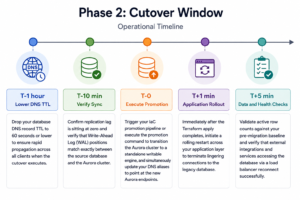
The cutover proceeds on the following operational timeline:
- T-1 hour (Lower DNS TTL): Drop your database DNS record TTL to 60 seconds or lower to ensure rapid propagation across all clients when the cutover executes.
- T-10 min (Verify Sync): Confirm replication lag is sitting at zero and verify that Write-Ahead Log (WAL) positions match exactly between the source database and the Aurora cluster.
- T-0 (Execute Promotion): Trigger your IaC promotion pipeline or execute the promotion command to transition the Aurora cluster to a standalone writable engine, and simultaneously update your DNS aliases to point at the new Aurora endpoints.
- T+1 min (Application Rollout): Immediately after the Terraform apply complete, initiate a rolling restart across your application layer to terminate lingering connections to the legacy database.
- T+5 min (Data and Health Checks): Validate active row counts against your pre-migration baseline and verify that external integrations and services accessing the database via a load balancer reconnect successfully.
Phase 3: Validation
- Compare system row counts and physical database sizes against the pre-migration baseline.
- Verify cross-database queries or foreign data wrappers function correctly if your architecture utilizes them.
- Verify that decoupled background tasks, scheduled scripts, or event-driven workers have correctly detected the new cluster identity.
- If your databases use PostGIS, run SELECT postgis_extensions_upgrade(); in each affected database immediately after promotion. It takes seconds and requires no downtime.
Phase 4: Cleanup
- Remove deprecated legacy database modules from your IaC repository.
- Remove the replication source identifier configurations from your active Aurora definitions.
- Restore your database DNS record TTL to its standard production baseline (typically 300 seconds).
- Clean up any temporary deployment configurations or lifecycle blocks once infrastructure drift checks confirm none remain.
Rollback Plan
Triggers for Initiating Rollback
- Application error rates exceed a critical baseline following the rolling restart.
- Database-consuming application instances fail health checks, crash, or enter unstable loops.
- The Aurora cluster reports an unhealthy status, or underlying data replication fails to converge.
Rollback Procedure
- Reverse your database DNS record modifications to point traffic back to the original database endpoints.
- Trigger another rolling restart across your application tier to force clients off the Aurora engine.
- Verify that application instances successfully reconnect to the legacy source instance and error rates stabilize.
Results: Cost Reduction and Improved Performance
Cost Reduction
Aurora I/O-Optimized eliminates unpredictable per-I/O charges. By combining this flat-rate storage pricing with Serverless v2’s dynamic capacity scaling, we eliminated the cost of maintaining over-provisioned headroom outside peak hours, resulting in a substantial drop in our monthly database spend.
Improved Performance
- Reader Lag: Reduced from multiple seconds to single-digit milliseconds under heavy load, making the reader endpoint entirely reliable for offloading application reads.
- Failover Time: Dropped from minutes to approximately 30 seconds or less via Aurora’s internal storage endpoint management.
- Dynamic Scaling: Compute resources scale seamlessly within seconds, allowing the cluster to handle sudden traffic spikes without pre-provisioning hardware.
- Migration Downtime: The recommended cutover approach delivered approximately 30 seconds of user-visible connection drops during the complete production transition from RDS to Aurora.
Conclusion
The recommended Aurora Serverless v2 migration path proceeds in five distinct architectural phases: connection abstraction preparation, deploying Aurora as a managed read replica, and executing a synchronized DNS swap with an intentional application rollout.
Three principles deserve emphasis during your migration planning:
- Inventory every external integration: Analytics pipelines, business intelligence tools, and background worker functions with hardcoded or isolated database configuration strings represent the most commonly overlooked failure points.
- Rehearse the cutover end-to-end in staging: Utilize the exact automated scripts, infrastructure configurations, rollback steps, and timing boundaries that you intend to use in production.
- Account for network connection persistence: Open client connections do not dynamically re-resolve DNS changes. An intentional, system-wide rolling restart is a non-negotiable requirement following any major routing modification.
For teams operating over-provisioned database instances or facing escalating transactional costs on read-heavy workloads, this modernization path provides immediate operational confidence and highly predictable cost forecasting.
Planning a migration to Aurora?
Connect with the AllCloud experts to discuss your migration strategy and learn how to minimize downtime while maximizing performance and cost efficiency.