In Brief
This blog post explores how organizations can transition from traditional batch ingestion to sub-second, real-time Retrieval-Augmented Generation (RAG) on AWS.
-
Understand why managed RAG pipelines fail when handling continuous, rapidly changing operational data.
-
Explore the architectural pitfalls of attempting to decouple managed knowledge bases from vector ingestion.
-
Discover how to build a resilient, serverless real-time RAG pipeline using Amazon DynamoDB Streams, AWS Lambda, Titan Embeddings, and S3 Vectors.
Key Takeaways:
-
- The Batch RAG Bottleneck: Standard ingestion jobs take minutes to chunk and embed documents. In dynamic environments—such as live support tickets and real-time infrastructure alerts—this latency leaves operational LLMs blind to recent critical events.
- Managed Setup Pitfalls: Bypassing standard sync workflows creates hidden architectural dead-ends. Overlapping ingestion jobs trigger concurrency errors (ConflictException), while writing raw vectors directly to the index causes retrieval failures (InternalServerException) due to strict internal metadata requirements within managed Knowledge Bases.
-
Fully Decoupled Serverless Architecture: Overcoming managed limits requires separating both paths into custom event-driven components: using DynamoDB Streams with Lambda for near-instant write-path ingestion, alongside a direct query Lambda for vector retrieval and LLM context injection.
-
Cost-Efficient Vector Storage: Relying on S3-backed serverless vector indexing eliminates expensive, 24/7 idle database hosting charges, delivering a pay-per-use model optimized for unpredictable operational traffic.
-
Architectural Trade-Offs: Fully managed services simplify upfront deployment, but real-time demands often mandate custom pipelines. Engineering teams must weigh the low latency and granular control of self-managed setups against the long-term operational maintenance and edge-case handling they require.
Most of us are familiar with the typical guides for constructing Retrieval-Augmented Generation (RAG) systems. You take a collection of PDF manuals, drop them into an object store, run an asynchronous ingestion job to chunk and embed them, and hook up your Large Language Model (LLM). This classic pattern works beautifully when your data changes weekly or even daily.
But what if your operational data changes rapidly? Your LLM must immediately answer questions regarding support tickets submitted seconds ago, live system alerts, or real-time chat messages.
In this post, we explore a practical technical approach—along with key takeaways—for achieving Real-Time RAG.
We will cover:
- A surprising failure: why bypassing ingestion components in a managed setup fails.
- An eventual success: how to build a reliable real-time RAG architecture on AWS.
The Operational Use Case: Why Batch RAG Didn't Work
To explore this setup, let’s look at the goal: an intelligent agent assistant for operations. The core feature is simple: a user asks a question, and the agent assistant searches across the history of live, updating support tickets to create an accurate status update.
If a client submits a ticket saying, “Database replica-3 went offline at 10:42 AM due to memory exhaustion,” and an engineer asks the LLM assistant at 10:43 AM, “Why are we seeing replica issues?”, the LLM must know about that ticket.
We wanted a way to write to our vector index instantly and get that context back right away without running slow ingestion tasks.
Meet our AWS Services toolkit
To solve this problem, we focused strictly on AWS serverless and managed AI services to keep our operational work as low as possible. Here are the core services we used:
1. Amazon Bedrock Knowledge Bases & Agents
- What they do: Amazon Bedrock Knowledge Bases provide a managed RAG wrapper that handles document parsing, chunking, and vector database syncing. Bedrock Agents manage conversation history, prompt steps, and tool actions.
- Our role for them: These managed components represent the standard AWS approach to managing conversational agent steps and searches.
2. S3 Vectors Index
- What it does: S3 Vectors provides cost-optimized, AI-ready storage with native support for storing and querying vectors at scale. Bedrock integrates with vector storage solutions backed by Amazon S3 and serverless vector indexing.
- The Cost-Saving Advantage: Traditional vector databases run 24/7 at high hourly rates. An S3-backed serverless vector index eliminates idle charges, billing only for stored vector data and executed queries.
- Our role for it: This serves as our vector storage layer, holding our embeddings and allowing us to search for records using similarity.
3. Amazon DynamoDB & DynamoDB Streams
- What they do: DynamoDB is a fully managed, fast NoSQL database. Enabling DynamoDB Streams allows us to capture changes (inserts, updates, deletes) instantly.
- Our role for them: This is our main store for incoming data and support tickets, capturing updates instantly as an event stream.
4. AWS Lambda
- What it does: AWS Lambda is a serverless, event-driven compute.
- Our role for it: Provides the serverless compute to run our execution code, map event streams, and manage pipeline steps.
5. Amazon Bedrock Titan Embeddings (Titan Embed v2)
- What it does: Amazon Titan Embedding models, are a fast, efficient text embedding model from Amazon.
- Our role for it: Transforms raw text and support tickets into standard 1024-dimension vectors.
6. Anthropic Claude (on Amazon Bedrock)
- What it does: Antropic Claude is a smart reasoning model, which is accessible via Amazon Bedrock. In our use case we used Claude 3.5 Sonnet.
- Our role for it: Serves as our primary language model, responsible for processing user questions and writing natural language answers.
Phase 1: The Traditional Path - Ingestion on Every Change
(And Why It's a Bad Idea)
Our initial instinct was to stick with the standard managed RAG pipeline but try to make it dynamic. The solution seemed simple: run an ingestion sync job (StartIngestionJob) immediately after any new ticket was written to our database.
However, we quickly realized that running a complete ingestion process on every single write is a poor design choice for real-time applications:
- The Sync Delay: Even if an ingestion run starts successfully, the process is not instant. The ingestion job takes anywhere from 30 seconds to several minutes to spin up, extract, chunk, embed, and index. This creates a time gap where new data remains invisible to the LLM.
- The Concurrency Block: Crucially, Bedrock Knowledge Bases do not queue overlapping sync tasks. Trying to start a sync via StartIngestionJob while a previous run is still active (with a status of STARTING or IN_PROGRESS) results in an immediate failure, throwing a ConflictException. This makes it impossible to handle parallel, real-time updates under a managed setup.
Phase 2: The "Clever" Managed Solution (And Why It Failed)
As engineers, we try to avoid reinventing the wheel. Our first instinct is always to rely on managed services that already work so we can focus on core business logic instead of low-level code. Naturally, our first design was built around Bedrock Agents and a Bedrock Knowledge Base pointing to our S3 Vectors index.
We knew that the managed ingestion job (StartIngestionJob) took 30+ seconds. So we tried a shortcut: Direct Vector Injection.
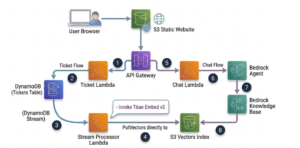
Ticket Flow (Write Path):
1. The user browser sends a request via API Gateway to the Ticket Lambda.
2. The Ticket Lambda writes the operational ticket to DynamoDB (Tickets Table).
3. A DynamoDB Stream triggers the Stream Processor Lambda.
4. The Stream Processor Lambda invokes Titan Embed v2 to generate vectors and pushes them directly into the S3 Vectors Index.
Chat Flow (Read Path):
5. The user browser sends a chat query via API Gateway to the Chat Lambda.
6. The Chat Lambda communicates with the Bedrock Agent.
7. The Bedrock Agent queries the Bedrock Knowledge Base.
8. The Bedrock Knowledge Base retrieves context from the S3 Vectors Index to generate grounded responses using Anthropic Claude.
Instead of relying on the Knowledge Base to process and ingest data into our vector database, we handled ingestion ourselves—hoping that Knowledge Bases would be flexible enough to query our custom structure.
On paper, it was perfect. The write path was very fast, and the data was stored. But when we went to test the read path via the Bedrock Agent, it did not work.
The Bedrock Agent called KB.Retrieve(), and our application immediately threw an InternalServerException.
The Root Cause
We had treated the Bedrock Knowledge Base as a generic wrapper over a vector index. It is not. The Bedrock KB Retrieve API works strictly on indexes populated by its own ingestion jobs. It looks for specific internal metadata schemas, split-tracking IDs, and custom document mapping structures. Because our Lambda injected raw vectors directly, the KB engine saw the index structure as corrupted or empty and threw an error.
Key Takeaway: Closed managed services control both the read and write paths. You cannot split them to write directly and read through their high-level abstraction API.
Phase 3: Pivoting to a Custom, Self-Managed Pipeline
Since we could not bypass the write path of the Bedrock Knowledge Base, we decided to remove the managed orchestration layer and build our own serverless pipeline. We kept the direct write path to the S3 Vectors index and built a custom query handler.
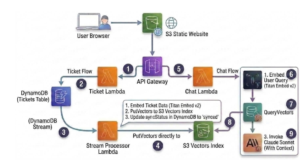
Ticket Flow (Write Path) – same as previous phase 2:
1. The user browser sends a request via API Gateway to the Ticket Lambda.
2. The Ticket Lambda writes the operational ticket to DynamoDB (Tickets Table).
3. A DynamoDB Stream triggers the Stream Processor Lambda.
4. The Stream Processor Lambda invokes Titan Embed v2 to generate vectors and pushes them directly into the S3 Vectors Index.
Chat Flow (Read Path):
5. The user browser sends a chat query via API Gateway to the Chat Lambda.
6. The Chat Lambda embeds the user query using Titan Embed v2.
7. The Chat Lambda issues a QueryVectors call to retrieve context from the S3 Vectors Index.
8. Context is retrieved from the S3 Vectors Index back to the Chat Lambda.
9. The Chat Lambda invokes Claude Sonnet with context to generate grounded responses.
So now we don’t only ingest data directly to the Vector DB, we also query it ourselves.
Summary & Recommendations
Standard managed knowledge base setups are often too restrictive when handling operational data updates in real time. If your workload searches static documents, Amazon Bedrock Knowledge Bases remains the optimal choice. However, when you require low-latency, continuous indexing, adopting a custom pipeline built with DynamoDB Streams, Titan Embeddings, S3 Vector indexes, and Lambda functions delivers the control, responsiveness, and cost-efficiency you need.
From a broader perspective: Managed services offer a major advantage by drastically reducing initial setup time and eliminating infrastructure maintenance. This allows engineering teams to iterate quickly and stay focused on core business logic. However, it is essential to recognize when a fully managed service no longer fits your specific requirements. Attempting to split a managed framework—such as executing queries through its read path while bypassing its ingestion pipeline—often introduces subtle errors, index corruption, and fragile configurations.
Moving away from managed orchestration to construct a custom, self-managed pipeline introduces significant architectural complexity and operational overhead. While modern AI coding assistants and development tools accelerate the writing of custom code and infrastructure logic, they do not eliminate the long-term responsibilities of ongoing maintenance, system debugging, and handling edge cases in distributed systems.
Ultimately, these pros and cons should be carefully weighed against your organization’s specific requirements. The final architectural decision must align with the particular demands of your use case, operational capacity, business constraints, and system constraints.
Need Real-Time RAG on AWS?
We help teams design, build and scale low-latency AI architectures.